👋 Hi, I’m Xiaoyao.
Recently, I decided to polish up a trainer I wrote a few years ago for Tavern of Gods and package it into a standalone .exe to share online. But right at the very last step—generating the EXE—I got completely stuck by a bizarre error for a good two hours.
Once I finally fixed it, I slapped my knee and realized: “I definitely fell into this exact same trap years ago, but I never wrote it down, so here I am making the same mistake today!”
To save my future self (and any fellow tinkerers who bump into this issue) from wasting precious time, I’m logging the whole troubleshooting process right here.
❌ The Error
After setting up the CT table and UI form in Cheat Engine (CE), I clicked “Save as EXE”.
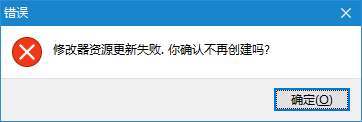
However, as soon as I hit generate, an error box popped right up:
Chinese CE Error Message:
修改器资源更新失败. 你确认不再创建吗? (Trainer resource update failed. Are you sure you want to stop creating?)
English CE Error Message:
Failure opening the trainer for resource updates. Make sure you do not watch the creation
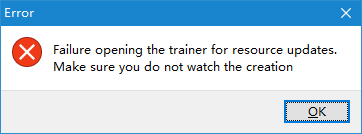
This error message is extremely misleading. My immediate instinct was: “Is my antivirus blocking the process?” or “Did CE’s resource generator module break?”
🔍 Root Cause & Why It Happens
After repeated tests, the underlying cause turned out to be surprisingly primitive: Cheat Engine’s built-in compiler/resource update module has poor support for non-ASCII characters (such as Chinese characters, accented letters, or special symbols) in file paths or names.
Triggering this resource update failure only requires meeting one of the following conditions:
- The export save path contains non-ASCII characters (e.g.,
D:\Game Trainers\Tavern.exe); - The target EXE filename itself contains non-ASCII characters (e.g.,
D:\Tools\众神酒馆修改器.exe).
This isn’t limited to Chinese characters either; paths with Japanese, Korean, Cyrillic, or other non-English language scripts will likely hit the exact same compilation block.
💡 The Ultimate Fix (The Right Way)
The solution is dead simple. The core golden rule is: “Generate with pure English paths first, then rename.”
- Choose a pure English directory: Set your export destination to a path consisting strictly of English letters (e.g.,
C:\Temp\or a pure English folder on your desktop). - Use a pure English filename: In CE’s export window, temporarily name your file using English characters (e.g.,
trainer.exeorgame_mod.exe). - Generate the EXE: Click generate. CE will now smoothly pass the resource compiler and successfully output the
.exefile into your destination folder. - Rename manually: Once generated, open Windows File Explorer and feel free to rename the exe file to whatever language or name you like (e.g.,
Tavern_of_Gods_Trainer_v1.1.0.exe). It will work perfectly with zero issues!
✍️ Final Thoughts
As the saying goes: “The palest ink is better than the best memory, but a blog post is better than both.”
If I had documented this trap when I first made a trainer years ago, I could have saved myself an hour or two of needless headache today. Hope this short troubleshooting log saves you some time if you happened to land here via search!